These days, many breeders use computer software to help them create pedigrees and keep track of data. There are many options you can choose from!
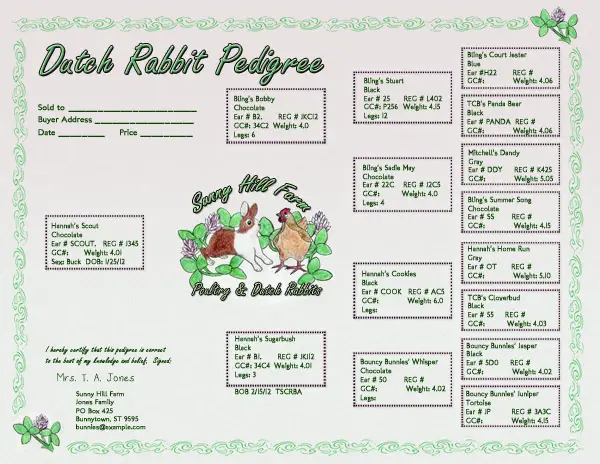 Create your Own Pedigrees using Microsoft Office Programs
You can always use Microsoft Word or other office programs to create your own custom pedigrees. In fact, we now offer Custom Pedigree Design!
ZooEasy Rabbit Breeding Software Review
Doing paperwork is important to succeeding in your rabbit project, but it can also be complicated and confusing. Which data should you take notes on? How do you make up record sheets? We all know how tedious it is to fill in pedigree blanks by hand. There’s good news, though! We’re happy to introduce you to ZooEasy Breeding Software, designed to take the hassle out of keeping your rabbitry records. This program will produce and print pedigrees, keep track of awards and points you’ve earned, and help you record notes on each animal or the offspring they produce. ZooEasy is produced in versions for more than a dozen species including dogs, cats, poultry, goats and cattle. In this ZooEasy review, we’ll focus on the rabbit version and give you an overview of the features, pros and cons you’ll experience with this product.
Top Features of the ZooEasy Software
When you choose ZooEasy for your rabbitry and breeding program, here are a few of the key features you’ll enjoy.
- Ease of use for recording the rabbit’s breed, color, sire/dam, breeder, etc.
- Accurate percentage of inbreeding in each litter.
- Pedigrees printed up to 5 generations.
- Pedigrees containing your rabbitry logo, watermark or picture.
- Printed index cards with essential information on each rabbit.
- Note-taking space in each record for any additional information.
- Automatic check to prevent duplicating earmarks.
- Quick copy function for recording data of siblings.
- Storage of multiple pictures of each rabbit.
- Easy search functions and sortable search by rabbit color.
- Virtual breeding of pairs to consider probable results.
- Tracking of breeding pairs, dates and results.
- Recording/retrieving show data and photos for each rabbit in your herd.
- Pedigrees emailed directly from the program with no printing/scanning.
- Data easily exchanged with other ZooEasy users.
- Record-keeping for rabbits bought and sold.
These are just the most essential features found in the ZooEasy Rabbit Breeding Software. Many breeders quickly find it an indispensable tool for keeping track of their rabbit information, producing accurate pedigrees and providing information to those who purchase their rabbits.
Pros and Cons of the ZooEasy Breeding Software
There’s a lot to like about this software. To begin with, it is very comprehensive. There’s a place to record all important and helpful information. And once that data is stored, it can be quickly referred to and easily integrated into pedigrees or sales information. The software even allows you to balance rabbitry income and expenses, develop a sortable contact list and record unlimited notes on each rabbit.
ZooEasy files are easily backed up to any type of storage device. The software works with Windows 7, Vista, XP and 2000, so it will work with most current computers.
In terms of possible cons, there are a few things worth mentioning. First, some will find the cost to be a bit high at $67. However, that price is fairly competitive with other rabbitry software programs, ZooEasy offers features that other programs do not.
Secondly, like with any new program, you’ll need to play with it for a few hours before you get fully comfortable with it. Your level of computer savvy will be a factor, but ZooEasy Breeding Software is very user-friendly. The program has more functions than most rabbit breeders use for their data, so you may not incorporate them all at first, or ever. That’s fine! Use what works for you, and you’ll have the extra functionality if you decide to expand your data entry.
Our Recommendation
For many rabbit breeders, the price of this software is viewed as an investment with excellent returns. The ZooEasy Breeding Software can save you hours of recording and sorting data. It may also help you organize and manage your rabbitry more effectively. When data is utilized, you can improve breeding results, which will produce more success at shows and higher prices for the rabbits you sell. We are glad to recommend ZooEasy Breeding Software Review to our readers!
Evans Software – A Popular Choice
Evans Rabbitry Management software is one of the most popular choices among rabbit and cavy breeders. This program, like many of the others, keeps track of your breeding records, creates printable and e-mail pedigrees, and can print show entry forms, among other features. The deluxe version has a color genetics function.
Luckyfoots, Gesswein’s Grand Champion Software and others
Here are links to several other rabbit pedigree programs. Please note that I have not used most of these and can’t personally recommend them. :)
- The Global Pedigree Project – an online pedigree manager
- Luckyfoots Software– Rabbitry, Club, and Show management
- Gesswein’s Grand Champion Software
Breeders Assistant by Tenset
Laurie Stroupe, the original owner of the Nature Trail website, used a program called Breeders Assistant. Here’s her review on the program.
I use Breeders Assistant for Rabbits and have since very near the beginning of my rabbitry. I love it. It is a fully functional rabbitry management software that keeps me organized!
I also have the optional genetics portion. Genetics can be tough, but playing around with the Trial Matings function is not only fun, but very educational. What happens if I put this buck with that doe? You’ll be amazed.
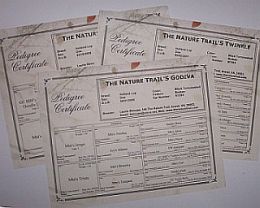
The pedigrees are fully customizable. I love my version, you could create very nice or exciting or funky pedigrees with Breeders’ Assistant that are totally different. Whatever suits your style. You can even put the rabbit’s picture on the pedigree, if you wish. I print my pedigrees on a laser printer, but if you are using a color jet, you can add color to your pedigrees as well.
It is very easy to control what I see on the various pages when I work in Breeders’ Assistant. You can see exactly the pieces of information that are important to you. Right now, when I work at my “Rabbits” tab, I can see the owner, rabbit’s name, ear number, date of birth, color, pattern, dam, and sire for each rabbit in my database at a glance. Other times, I’ve shown the GC#, registration number or weight. That makes it very easy to check for missing information. Since it is so easy to change, I modify the view whenever it might be useful.
I can create reports and print them out easily. Perhaps I’m ready to tattoo my three-month olds. Or maybe I want to sort my does according to age. I can print out a report of whatever I need.
Although you can request a disk and wait for it to arrive by mail, I purchased my copy online and downloaded it the same day. I couldn’t wait to get into it and start entering my rabbits right away. It was easy to get started with, too.
If you already use another software, chances are good that you can import your data and not have to enter it again.
I think that if you choose Breeders Assistant rabbitry management software as your rabbitry management software, you will be glad you did.
-Laurie Stroupe